
What the location accuracy number actually describes
The accuracy value is a radius in metres around the reported coordinates. For locations supplied by the browser, MDN documents it as the radius of 95% confidence around the reported position. It describes your position only. It does not measure the compass, and it cannot tell you whether your prayer mat is lined up.
The browser and operating system choose how to estimate your location, so do not assume the fix came from GPS. The request runs only on a secure page, only with your permission and only after you tap Use my location. MDN’s notes on location requests explain these conditions. When the browser reports a positive value, the finder shows it with your result and notes that it is not compass accuracy. The circle is not a building boundary or a surveyed fix.
A figure you type into Position uncertainty (metres, optional) is your own estimate. The 95% meaning applies only to values the browser reports, and the site attaches no confidence level to a typed figure. A blank field or a zero does not prove that a position is exact.
Metres of position uncertainty are not degrees of heading error
| Part | Unit | Depends on | Where to check |
|---|---|---|---|
| Origin point | Latitude and longitude in decimal degrees | Device location, a city preset (an approximate centre), typed coordinates, a shared link or the map | The place or coordinates shown with your result |
| Position uncertainty | A radius in metres, when one is reported or supplied | The browser’s location estimate, or a figure that you or a sender entered | The uncertainty note under your result, or the Position uncertainty (metres, optional) field |
| Calculated bearing | Degrees clockwise from true north | The origin and the Kaaba reference coordinates | The number labelled from true north |
| Device heading | Degrees, from a magnetic reading the phone reports, corrected once to true north | The phone’s sensor, how you hold it, nearby metal or magnets, and the magnetic correction | Device heading in live compass mode. The text beneath it shows the heading source and the correction applied. If the pointer is jumpy, get help with an unstable compass arrow. |
Each of these parts can go wrong on its own. A tight position radius never guarantees a good heading, and a steady heading never confirms that the origin is right. To check a result, work down the table in order: first the place shown, then its radius, then the bearing from true north. Judge the live arrow last.
Why distance to the Kaaba changes how much uncertainty matters
Picture every possible position inside your uncertainty circle, with a bearing drawn from each one to the Kaaba. In the usual case, those bearings come out very similar. That holds when three things are true. The circle is small compared with your distance to the Kaaba. You are well away from the Kaaba itself. You are also well away from its antipode (the point on the opposite side of the globe) and from the geographic poles.
Being far from the Kaaba is not enough on its own. Near the antipode, the shortest route can set off in almost any direction, so even a small circle can contain very different bearings. Near the Kaaba, positions inside the circle may lie on different sides of it, so a single arrow could point the wrong way.
No single rule converts metres into degrees, because the effect depends on where you are. The finder cannot detect every situation in which the possible bearings spread widely. It withholds a single arrow only in the specific guarded cases described next.
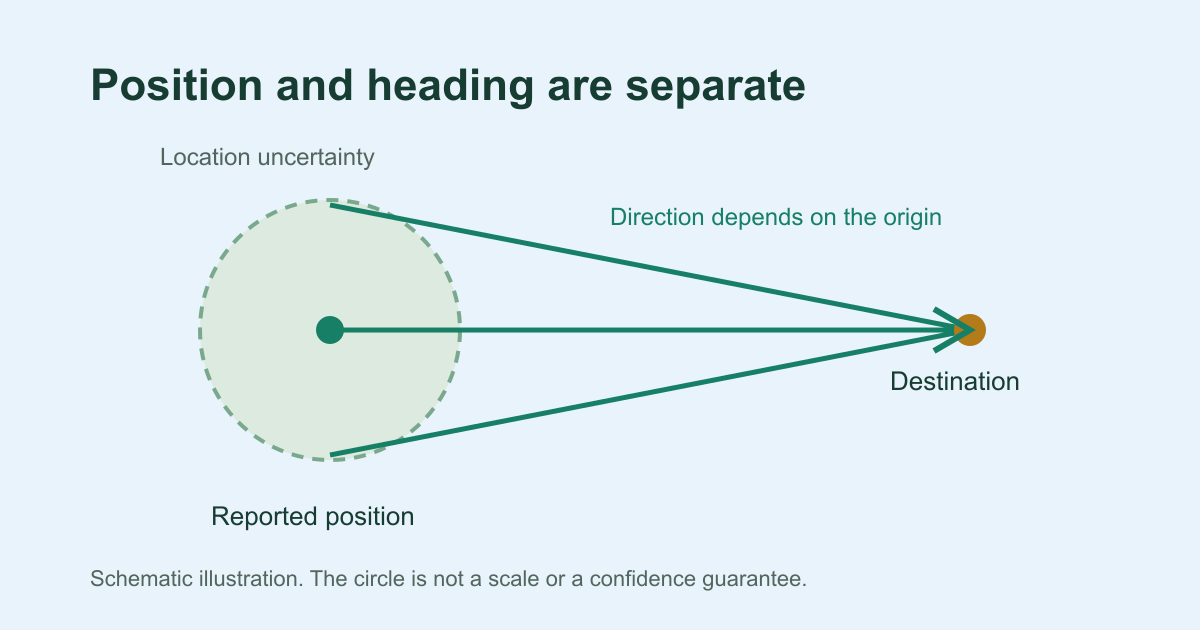
Far from the target and antipode
Small radius · nearly overlapping bearings
Uncertainty reaches the target
Schematic · not to scale · no live readings
When the finder withholds a direction
The finder withholds its normal bearing and shows a short explanation instead in two cases:
- The selected point is within 25 metres of the Kaaba reference point or of its antipode. If a larger uncertainty radius has been supplied, the finder uses that radius instead of 25 metres.
- The point is exactly at a geographic pole, where a local true-north reference is undefined.
The 25 m figure is a conservative safeguard built into the tool. It is not a boundary of the Kaaba, a religious rule or a statistical guarantee. A missing radius is never treated as exact, because the 25 m minimum still applies when no radius is supplied. If you are close to the Kaaba, follow established local guidance rather than a phone fix. The methodology page explains these near-destination safeguards in more detail.
A steady bearing can sit beside a moving arrow
Once the origin is fixed, the calculated bearing does not change. It is a spherical, initial great-circle bearing, measured clockwise from true north to a published reference point for the Kaaba. The same inputs always give the same number. That stability tells you nothing about your phone’s sensor.
By default, the arrow shows a north-up bearing and stays still. After you tap Enable live compass, the pointer follows a separate heading reading and should move as you turn. The conditions below affect that reading, and none of them changes your coordinates:
- The phone must report a known magnetic heading. This can be a supported compass heading or an absolute orientation reading. The finder treats both as magnetic and corrects them once. It never treats an unknown relative orientation as true north.
- Hold the phone flat or nearly level, within about 5°, with the screen in portrait orientation. Live alignment pauses in landscape or when the phone tilts beyond that range.
- The correction adds the local declination to the magnetic heading, counting east as positive. It needs the bundled World Magnetic Model, which this finder uses until 13 November 2029 at 03:00 UTC. It also needs a horizontal magnetic field of at least 6,000 nT. Without a valid correction, live alignment does not appear. If your selected point has a valid bearing, you can still use that true-north number, along with the optional map if it loads.
- The model describes Earth’s main magnetic field. It does not remove local interference from metal or magnets.
It is normal for the pointer to move while you turn the phone. If it jumps or drifts while you hold the phone still, the cause is the heading, the way you are holding the phone or local interference. A better location fix will not cure it, so use the compass troubleshooting guide instead.
Check the selected point and choose a fallback
- Confirm that the place or coordinates shown match where you actually are. The finder requests your location once and does not follow you, so request it again if you have moved.
- Look at the reported uncertainty. A new request may return a tighter radius, but there is no guarantee that it will.
- If the area looks wrong, switch method. Enter coordinates instead accepts decimal latitude and longitude. Search city presets gives an approximate city centre, not your address. Open map lets you pick a point with Use map centre. These optional map tiles reveal your IP address and the area you view to the map provider.
- If your city is not in the suggestions, you can still use the finder by entering the city’s decimal coordinates.
- Once the point is right, compare the bearing with a trusted true-north reference. Judge the live arrow as a separate step.
A more specific point is not automatically more accurate, because a typed or map point can still be mistaken. To decide whether a city preset is close enough, choose a suitable location method. When your point looks right, calculate from a selected point.
Keep uncertainty with saved and shared points
A saved or shared point is the selected point carried forward. It is not a new position measurement, and it does not follow you when you travel. The point may come from an earlier browser location estimate. It may also come from a city preset, typed coordinates or the map, and in those cases the finder never measured it. Keep any uncertainty that came with the point, so whoever uses it later can see the radius that was reported or supplied. That radius does not certify how precise the point really is.
- Share location creates a link containing the coordinates, the label and any supplied uncertainty. Recipients, browser history and sharing services can all see the full link, so it is not anonymous. The finder marks a sender’s radius as sender-provided, not as a fresh fix. Read more about sharing selected coordinates.
- Remember this location on this device is off when you first use the finder. It stores the point on your device only after you opt in. If you opted in earlier, the homepage can restore the point, and the finder labels its uncertainty as a previous value.
- Reset finder clears the active point but leaves an earlier saved point in place. Clear saved location removes the stored point when the browser allows it. If the finder says it could not, clear this site’s data in your browser settings.
Coordinates typed without a radius are not proof of exactness. A city page starts from its own city unless you open it from a shared link. It never saves a location unless you choose to.
Common questions about Qibla accuracy
Does the Qibla direction change when I move?
The reference point for the Kaaba stays fixed. What changes is your origin. A different selected point can give a different bearing, so check the current result for where you are now. If you travel, select your new location rather than relying on an earlier saved point.
Which Qibla compass is the most accurate?
No single figure answers this, for this finder or any other. Accuracy depends on three parts: how well the origin matches where you are, the true-north bearing calculated from it, and the phone’s heading if you use a live compass. Rather than relying on a ranking, ask the same questions of any tool. Does it show the origin it used? Does it say whether its bearing is from true north or magnetic north? Does it tell you when its heading cannot be trusted?
Does the Qibla direction have to be exact?
That is a religious question, and this site does not give rulings. It offers geographic guidance: a calculated bearing from a stated origin. To find out how exact your direction needs to be, ask a qualified local religious authority.